School Intelligence / Competence AI

COMPETENCE AI · SCHOOL INTELLIGENCE

Powerful AI.
Practical support.
Better learning.

Artificial intelligence should make an educator’s day easier, not more complicated.

Competence Studio brings together trusted school information, accessible educational AI tools and carefully designed workflows to help educators prepare, assess, understand and respond.

Less time on repetitive administration.
More time for meaningful teaching and learner support.

Competence AI is a capability within School Intelligence—not a separate chatbot. The workflows below describe the product’s intended direction, developed progressively. Ask which capabilities are currently available to demonstrate.

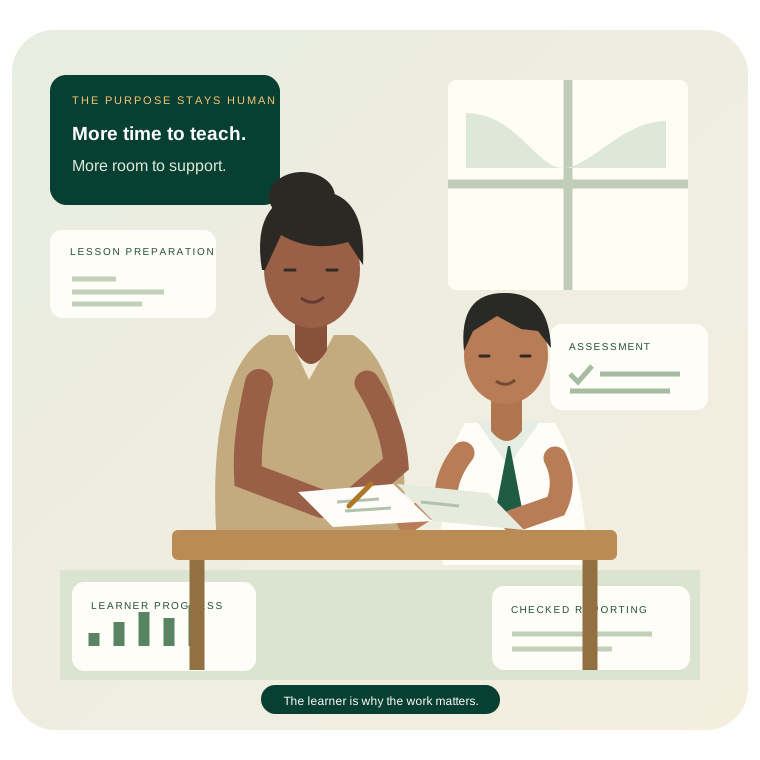
Original illustration of a South African educator preparing work beside a learner in school uniform, with lesson, assessment, progress and reporting materials around them.
Practical support for the educator. A better opportunity for the learner.

LESS RECAPTURING. MORE USEFUL INFORMATION.

Capture once.
Use everywhere.

Schools already collect valuable information about attendance, assessment performance, teaching progress and learner support. The problem is that it often has to be copied into different forms, spreadsheets and reports.

Competence Studio changes the approach. Once information has been captured and verified, it can support educators, school management, departmental reporting and learner intelligence—without asking someone to enter the same information again.

One verified school record

Captured, checked and confirmed by the appropriate person

One record. Only the uses and people the school authorises.

  • 01Educator File
  • 02Learner Intelligence
  • 03HOD oversight
  • 04Departmental reports
  • 05AI analysis

Reuse does not mean unrestricted access. Role-based permissions still apply. Missing information must be collected or clarified—not invented by AI.

01 TEACHING & LEARNING RESOURCES

Better lessons start
with better resources.

Preparing an effective lesson involves finding suitable information, choosing the right examples and adapting material for different learning needs.

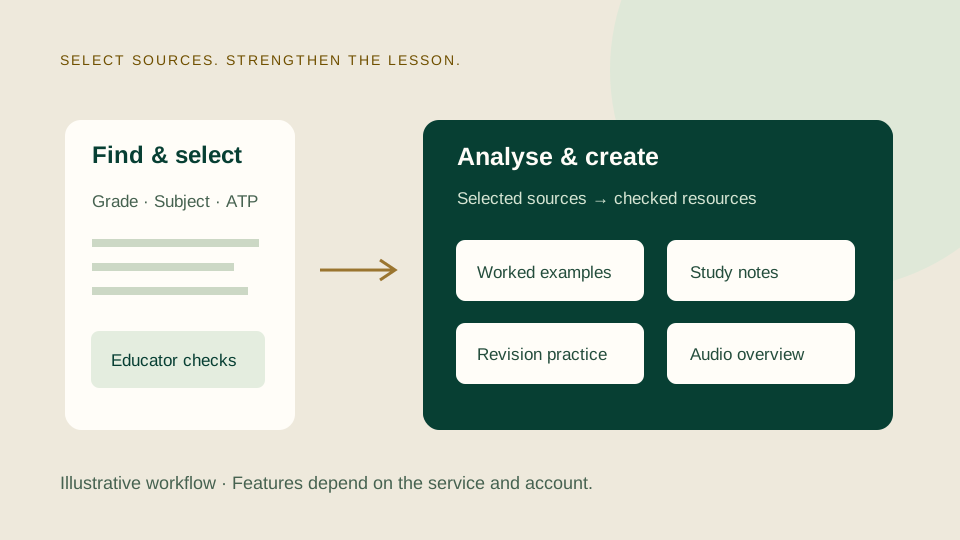
Competence Studio guides educators through a practical two-phase process using available Google educational AI tools, including NotebookLM.

First, identify and select useful curriculum-aligned sources. Then use those sources to develop learning resources that support the lesson.

ILLUSTRATIVE NOTEBOOKLM WORKFLOW

  1. 01

    Find and select

    Establish the grade, subject, ATP topic and learning objective. Prepare guidance for finding and evaluating sources. The educator checks and selects what to use.

  2. 02

    Analyse and create

    Work from the selected sources in NotebookLM or other available Google tools. Check accuracy, curriculum fit and suitability before classroom use.

Lesson explanationsPresentationsStudy notesWorked examplesRevision worksheetsAudio overviewsInfographicsVideo resources, where supported

An educator-guided external-tool workflow, not a claim of a live integration. Features, quotas and output types depend on the service and account entitlements. Use only sources the school permits; do not upload identifiable learner records without appropriate authorisation.

For the learner

Clearer explanations and more purposeful practice—selected and checked by the educator who knows the class.

02 ASSESSMENT INTELLIGENCE

From better questions
to better learner support.

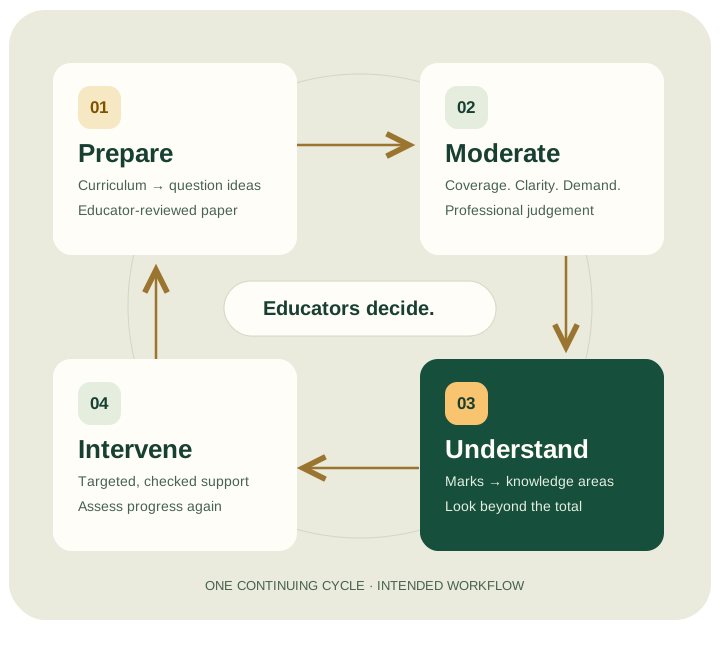
Assessment should do more than generate marks. Competence Studio helps educators use CAPS and Annual Teaching Plan content to develop assessment ideas and structured question papers.

AI-assisted moderation recommendations help Heads of Department examine curriculum coverage, memorandum accuracy, mark allocations and cognitive demand.

With a checked assessment blueprint and confirmed marks, structured mark sheets can reveal performance by question, knowledge area and cognitive level—making it easier to see where support may be needed.

Subject-specific CAPS requirements guide cognitive-demand review. Verified calculations are distinct from AI interpretations; educators and HODs retain the decisions.

Explore Assessment Intelligence
Prepare, moderate, understand and intervene: the connected assessment cycle, followed by reassessment.
Prepare → Moderate → Understand → Intervene

03 SHARED FRONTIER AI

Advanced AI for the whole school—
without a paid account for every educator.

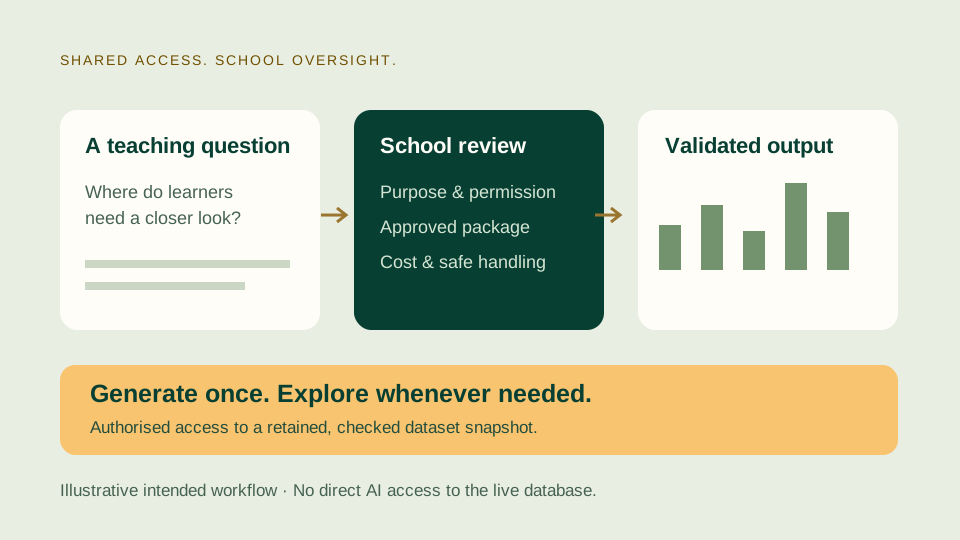
Some questions require deeper analysis than a standard school report can provide. The intended shared-access workflow lets educators request a more detailed investigation of confirmed school information, with school oversight at every step.

  1. 01

    Educator request

    A useful teaching question

  2. 02

    Prompt package

    Authorised data, context and clear instructions

  3. 03

    Administrator review

    Check purpose, permissions and cost

  4. 04

    Shared Frontier AI

    School-managed access, not shared passwords

  5. 05

    Dashboard validation

    Check findings, calculations and safe output

  6. 06

    Educator access

    Retain the checked output for authorised use

“Which knowledge areas caused the greatest difficulty in this assessment?”A fictional Grade 10 Mathematics educator

The system is designed to prepare an approved data package; AI does not connect directly to the school’s live database. An authorised administrator reviews the request and uses school-managed Frontier AI access. A generated HTML dashboard must be validated before publication in a controlled viewer.

ILLUSTRATIVE SHARED INTELLIGENCE

Grade 10 Mathematics

Ubuntu Secondary School · Fictional snapshot F-01 · 3 learners · 8 questions · 50 marks each

FICTIONAL DATA
Explore this illustrative dashboard

Knowledge-area comparisons

Generate once. Explore whenever needed.

The intended model is to pay for generation when needed, then return to the retained output without repeating the request. Provider pricing and access conditions still apply. A dashboard reflects a particular confirmed dataset; it needs review or regeneration when those records change.

Generated findings are interpretations—not official decisions. This browser demonstration illustrates the intended experience; it is not a live Frontier AI integration or evidence of operational dashboard publication.

04 DEPARTMENTAL REPORTING

The information is already there.
Why capture it again?

Schools are regularly asked to produce lists, spreadsheets and reports using information they have already recorded. Competence Studio is designed to make that work easier.

When a school receives a departmental reporting request, authorised staff can use information already held in the system to prepare the required document.

For unfamiliar templates or reporting requirements, AI can assist with interpreting the request and mapping the necessary information into the required format. The completed document is checked and approved by the school before submission.

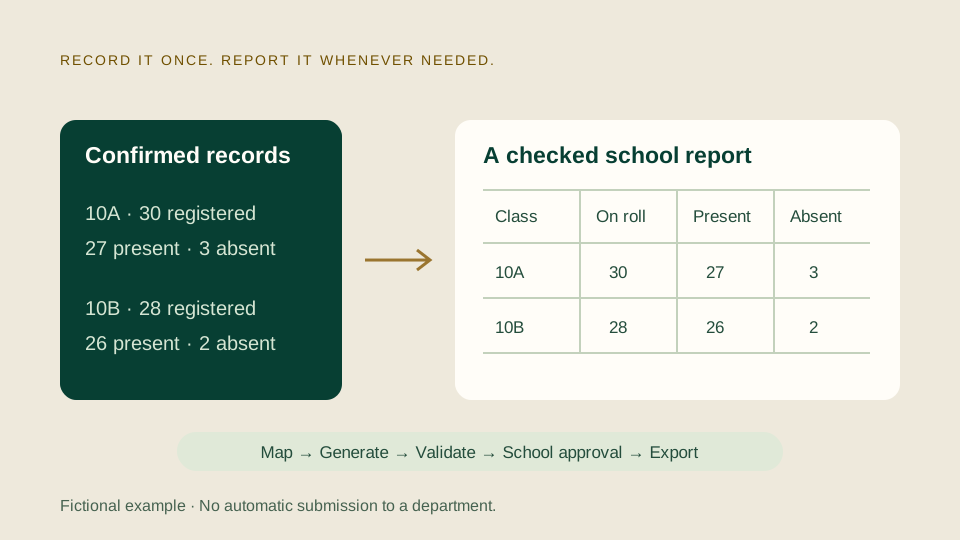
Record it once. Report it whenever needed.

  1. Reporting request received
  2. Existing school information identified
  3. Authorised database extraction by the application
  4. AI-assisted interpretation of unfamiliar template requirements
  5. Completed spreadsheet generated
  6. Validation and school approval
  7. Export ready for submission

TRY A FICTIONAL REPORTING EXAMPLE

A request. Existing records. One checked report.

Illustrative Grade 10 attendance return—not an official DBE, WCED or CEMIS template.

NO REAL SCHOOL DATA

The request

“Provide registered, present and absent totals for each Grade 10 class.”

Registered learners
Confirmed class count
Present
Confirmed daily attendance count
Absent
Registered minus present

If an unfamiliar template asks for information not held—such as transport routes—staff must clarify or collect it. AI cannot fill the gap with a guess.

The fictional records are ready. Generate a report to see how checked information can be reused.

Interpret once. Reuse the validated report.

AI can help with an unfamiliar requirement. Deterministic software should generate and validate repeat reports—without a new Frontier AI call each time. This local CSV example does not extract a database or submit anything to a department.

05 INDIVIDUAL LEARNER SUPPORT

Every learner has a story.
AI helps educators see it more clearly.

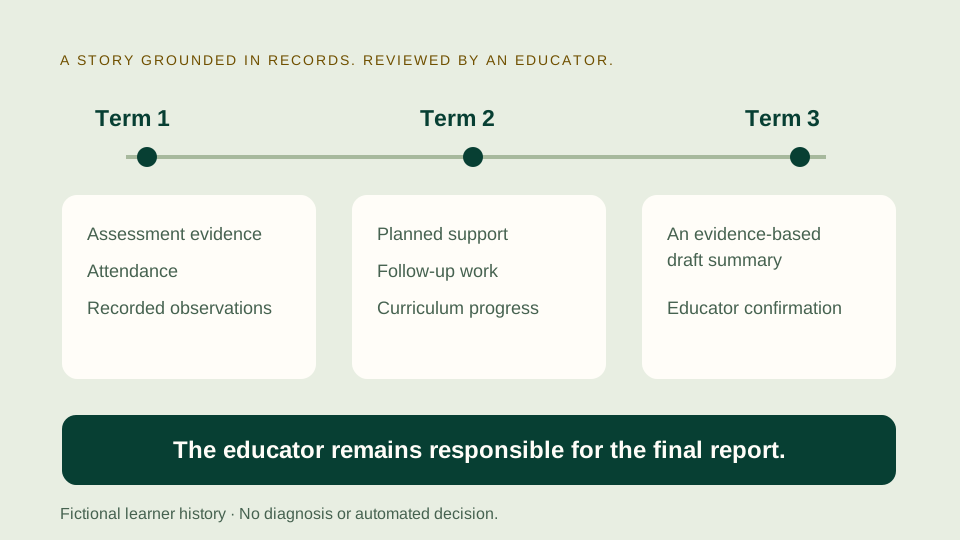
Everyday school activity gradually builds a richer understanding of each learner. Assessment results, attendance patterns, educator observations, curriculum progress and recorded interventions can be brought together across terms and academic years.

Competence Studio is designed to help authorised educators examine that information and recognise emerging difficulties. At term-end, AI can assist with preparing evidence-grounded learner summaries using confirmed records.

Instead of rebuilding a learner’s history from memory, the educator reviews, corrects and confirms the suggested narrative. The educator remains responsible for the final report.

FICTIONAL LEARNER A · ILLUSTRATIVE HISTORY

  1. Term 1

    Notice the evidence

    Assessment: 24 / 50. Functions: 2 / 15. Attendance: 44 / 50 days. Recorded observation: needs help explaining graph relationships.

  2. Term 2

    Support, then check

    Educator records a small-group functions activity and two follow-ups. A later practice task records 7 / 10—not directly comparable to the earlier assessment.

  3. Term 3

    Review the story

    Bring confirmed results, attendance, curriculum progress and support records together. A missing observation remains missing.

Illustrative draft—not a final report

“Learner A participated in recorded functions support. A later practice task shows 7 / 10. Review independent classwork before deciding the next step.”

Educator checks → corrects → confirms

Invented records, not an actual learner. No diagnosis, prediction of a learner’s future or claim that the support caused improvement. The intended longitudinal view can span academic years where authorised records exist.

06 AI-ASSISTED INCIDENT REPORTING

It starts with the register. Not another form.

Speak naturally. Review the report.
Keep the record.

An educator records a relevant observation as part of the normal school routine. Once the paper record is captured and verified, Competence Studio identifies matters requiring further attention.

When a detailed report is needed, the educator can describe what happened in their own words. AI assists with transcription and a structured statement, which the educator reviews and confirms.

The original observation, confirmed statement and subsequent follow-up remain connected.

Less time writing. Better records. More time for learners.

ONE OBSERVATION · A CONNECTED RECORD

From an ordinary paper register to appropriate follow-up

Register-class and subject-class educators use the same controlled observation-code reference during normal attendance routines.

  1. 01
    Paper record

    SA-02 · Subject class weekly attendance & observation

    THURSDAYLearner no. 14Code DIS
    Fictional example using fields present on the controlled sheet. SA-01 provides the same learner-number and code fields for register class.
  2. 02
    Captured and verified

    The scan is checked against the controlled form and code reference. The original paper reference is retained.

    Only verified information moves on.
  3. 03
    Follow-up considered

    The observation makes an incident-report option available. School policy determines when a report is compulsory.

    Positive observations and routine concerns remain distinct from incidents.
  4. 04
    Voice-assisted statement

    If a detailed report is needed, the educator speaks naturally, then reviews and confirms the structured statement below.

    Try the local example ↓
  5. 05
    School follow-up

    The paper observation, confirmed statement, authorised review or investigation, decision and follow-up stay connected to the relevant learner history.

Current workflow: controlled paper capture first. Authenticated digital entry may support the same governed process in future; it does not replace the current paper origin shown here.

ILLUSTRATIVE INTERACTIVE EXAMPLE

From spoken account to reviewed statement

Fictional browser-only demonstration. No microphone, recording, transcription service or school system is used.

LOCAL · SYNTHETIC
01

ORIGINAL SPOKEN ACCOUNT

Your words, as spoken

“During the second break, I saw two learners arguing near the classroom. I asked them to stop and move apart. Another educator came over, and we spoke to the learners separately.”
Illustrative transcription · fictional account · no audio captured
02

AI-ASSISTED STATEMENT

Your statement, ready to review

The structured draft will appear here beside the original account.

NOT PREPARED

Original fictional account ready. Prepare the statement when you are ready. Nothing is recorded or sent.

The school remains responsible.

Every controlled observation can make an incident report available; the school's approved policies determine when reporting is compulsory. An observation is not automatically misconduct, and an allegation is not a finding. Authorised people investigate and decide, with records and follow-up kept under appropriate access.

See how governed conduct records connect to Learner Intelligence

THE DIGITAL EDUCATOR FILE

Your teaching
builds your file.

Competence Studio’s Digital Educator File is designed to bring together evidence of everyday professional work: teaching resources, assessments, attendance, curriculum progress, observations and learner-support activities.

Information is organised as work is completed, rather than asking educators to maintain another set of documents. The aim is a useful teaching workspace and a professional portfolio that can be reviewed and reproduced when needed.

Discover the Digital Educator File →

Competence Studio keeps the school’s digital CAPS and ATP copies up to date—not another document-checking task for educators.

Explore actual CAPS and ATP source pages →

THE RIGHT TOOL. FOR THE RIGHT TASK.

Designed for schools
where every rand matters.

Effective use of AI should not depend on every educator having a paid subscription. Competence Studio combines guided access to available educational AI tools with centrally managed Frontier AI for more demanding tasks.

EDUCATOR-GUIDED GOOGLE AI

Prepare with confidence.

For lesson preparation and learning resources, using selected sources and school-permitted tools.

Educator selects and checks
SCHOOL-MANAGED FRONTIER AI

Investigate with oversight.

For governed, data-intensive analysis and sophisticated outputs, using approved data packages.

Administrator reviews. Educator uses.

Both paths lead back to better teaching and learner support.

Retain useful outputs, avoid unnecessary repeat processing and keep the school in control of AI expenditure. Actual costs depend on usage and provider terms; savings are not guaranteed and paid features are not universally free. Shared access means authorised school-managed use—not account or password sharing.

PROFESSIONAL JUDGEMENT, ALWAYS

AI assists. Educators decide.
Schools remain in control.

Competence Studio is designed around human professional judgement. AI-generated recommendations are checked before they become part of a formal school process.

Access to learner information is governed by roles and responsibilities. School records remain under the school’s control, with appropriate approval before information is used in external tools.

Technology supports the people responsible for teaching, assessment, intervention and school management. No automated learner decisions or legal certification are claimed.

SEE THE WORKFLOWS, STEP BY STEP

Practical stories.
Not another technology lecture.

Short explainers are planned for the workflows below. They are not yet available on this page.

Selected curriculum sources become educator-reviewed lesson resources.60 sec · planned

TEACHING RESOURCES

Better Lessons. Less Preparation.

From a learning objective to selected sources and checked classroom resources.

Explainer coming soon
An educator request passes school review before shared AI analysis and validated access.60–75 sec · planned

SHARED FRONTIER AI

Shared AI. School-Owned Intelligence.

A purposeful request, a reviewed package and a useful output the school can retain.

Explainer coming soon
Confirmed fictional class counts flow into a checked report for school approval.60 sec · planned

DEPARTMENTAL REPORTING

Recorded Once. Ready When Needed.

Reuse confirmed information to prepare a report without recapturing it.

Explainer coming soon
Fictional learner records across terms inform an educator-reviewed draft narrative.60–75 sec · planned

LEARNER SUPPORT

Every Learner Has a Story.

Evidence across terms, brought together for professional review and thoughtful support.

Explainer coming soon

EVERY LEARNER MATTERS. EVERY DAY MATTERS.

More time to teach.
Better information to act.
Every learner benefits.

Discover how Competence Studio helps your school make practical use of AI—simplifying administration, enriching lessons and turning everyday information into opportunities for earlier learner support.

Competence AI explainer